Hand clients a back end with your name on it
White-label puts your agency's name and logo in place of Themeasy's — in the WordPress admin, where clients manage the site, and in the Elementor editor, where they edit it. One switch, every admin user, your brand.
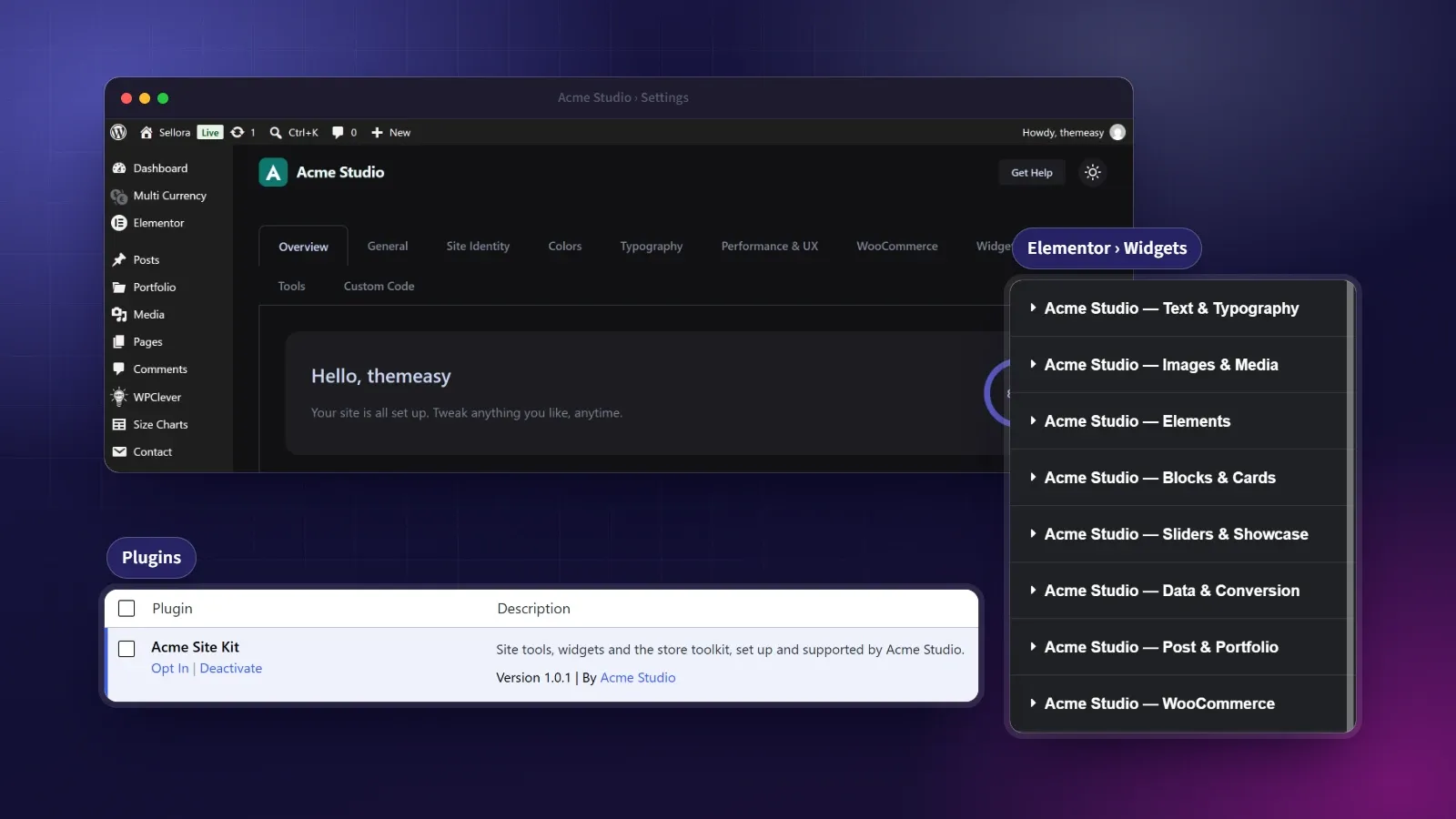
Your brand in the WordPress admin and the Elementor editor.
For an agency, the back end is part of the deliverable. A client logging in to a toolkit branded for someone else is a small crack in an otherwise polished handover. White-label seals it.
Turn on one master switch and your name and logo take Themeasy’s place where clients actually work: the plugin’s menu, page headers and top bar in the WordPress admin, its row in the Plugins list, and the widget categories, the template library and the icon library tabs in the Elementor editor. On a Themeasy theme, the setup wizard’s logo, welcome title and Help Center link and the theme author follow too. Fill in as much or as little as you like; blank fields keep the defaults. We’re equally clear about the boundaries: the theme’s license screens, the login screen and emails still read Themeasy, and the control sections Themeasy adds to the editor carry no brand name on any plan, so nothing misleads.
At a glance
- Your brand in the WordPress admin
- Your brand in the Elementor editor
- Rewrite the Plugins-list row
- One master switch, every admin user
- An Agency-plan feature
What you get
Your brand in the admin
Your name and logo on the plugin's menu, its page headers and the admin top bar, with the Get Help link pointing to your support.
Your brand in the editor
The Elementor widget categories, the template library and the icon library tabs carry your name instead of ours.
Rewrite the plugins row
Set the plugin's name, description and author in the Plugins list, so it reads as yours, not ours.
One switch, every user
A single master toggle applies your branding for every admin user on the site; fill only the fields you want, blanks keep the Themeasy default.
Honest about what changes
White-label rebrands the screens your clients work in day to day — and we're clear about the parts it leaves alone.
What you can rebrand
- The plugin's admin menu (name and icon) and the browser-tab title of its screens
- The plugin's page headers and the admin top bar — name, logo and help link
- The plugin's row in the Plugins list — name, description and author
- The Elementor widget categories, the template library and the icon library tabs
- On a Themeasy theme, the setup wizard's logo, welcome title and Help Center link, and the theme author under Appearance → Themes
What it leaves alone
- The theme's license screens and the links on the setup wizard's last screen, which still read Themeasy
- The WordPress login screen, dashboard widgets and emails
- Account, billing and licensing screens — handled by your license provider
The fields you control
| Field | What it overrides |
|---|---|
| Hide Themeasy branding | The master switch — nothing changes until it's on |
| Brand name | The Themeasy name in the admin menu, the page headers, the top bar, the Elementor editor and the theme's setup wizard |
| Top bar logo URL | The logo in the admin top bar and in the theme's setup wizard |
| Menu icon URL | The icon of the admin menu item (blank uses the top-bar logo) |
| Vendor name & URL | The plugin author and links in the Plugins list, and the author of the Themeasy themes under Appearance → Themes |
| Plugin name & description | How the plugin reads in the Plugins list |
| Support / help URL | The Get Help link in the admin top bar and the Help Center link in the theme's setup wizard |
| Hide menu item | Removes the White Label screen from the menu and locks it behind a secret recovery URL |
Questions, answered
Which plan includes white-label?
It's an Agency-plan feature — the White Label screen appears on sites licensed under the Agency plan. Agency is everything in Pro plus white-label.
Where exactly does my brand replace Themeasy's?
In the WordPress admin — the plugin's menu, its page headers, the top bar and its row on the Plugins screen — and in the Elementor editor, on the widget categories, the template library and the icon library tabs. On a Themeasy theme it also reaches the theme's setup wizard (its logo, welcome title and Help Center link) and the theme author under Appearance → Themes. Your site's front end never showed the Themeasy brand in the first place.
What still says Themeasy?
The theme's license screens, where your license is managed, and the links on the setup wizard's last screen. The WordPress login screen and emails are left untouched too. The control sections Themeasy adds to the editor (Motion on each widget, plus those on containers and in Page Settings) carry no brand name on any plan, so there's nothing there to replace.
Does white-label need a Themeasy theme?
No. White-label loads with the Agency plan on any theme. The plugin's menu and page, its row in the Plugins list and the Elementor editor carry your brand whether or not the site runs a Themeasy theme. On a Themeasy theme it goes further, into the theme's setup wizard and its author on the Themes screen.
Will it rebrand the billing screens?
No. Account, billing and licensing screens are handled separately, through your license provider rather than this page.
Made to work together
Settings Panel
One panel to run your whole site.
Site identity, layout, performance, custom code, a widget manager and one-click export/import — every global setting in one tidy place.
ExploreTheme Builder
Design every part of your site, visually.
Build headers, footers, archives, single posts and more in Elementor — each one a reusable Global Section, placed exactly where your rules say.
ExploreEvery feature, every site, one plan
White-Label is the Agency edge of the Themeasy plugin — everything in Pro, with your brand in place of ours in the WordPress admin and the Elementor editor, on unlimited client sites.