Cinematic sections, zero custom code
Themeasy layers extra controls onto every Elementor container, so the effects that usually need a developer — scroll motion, parallax, animated gradients — become a few clicks in the editor.
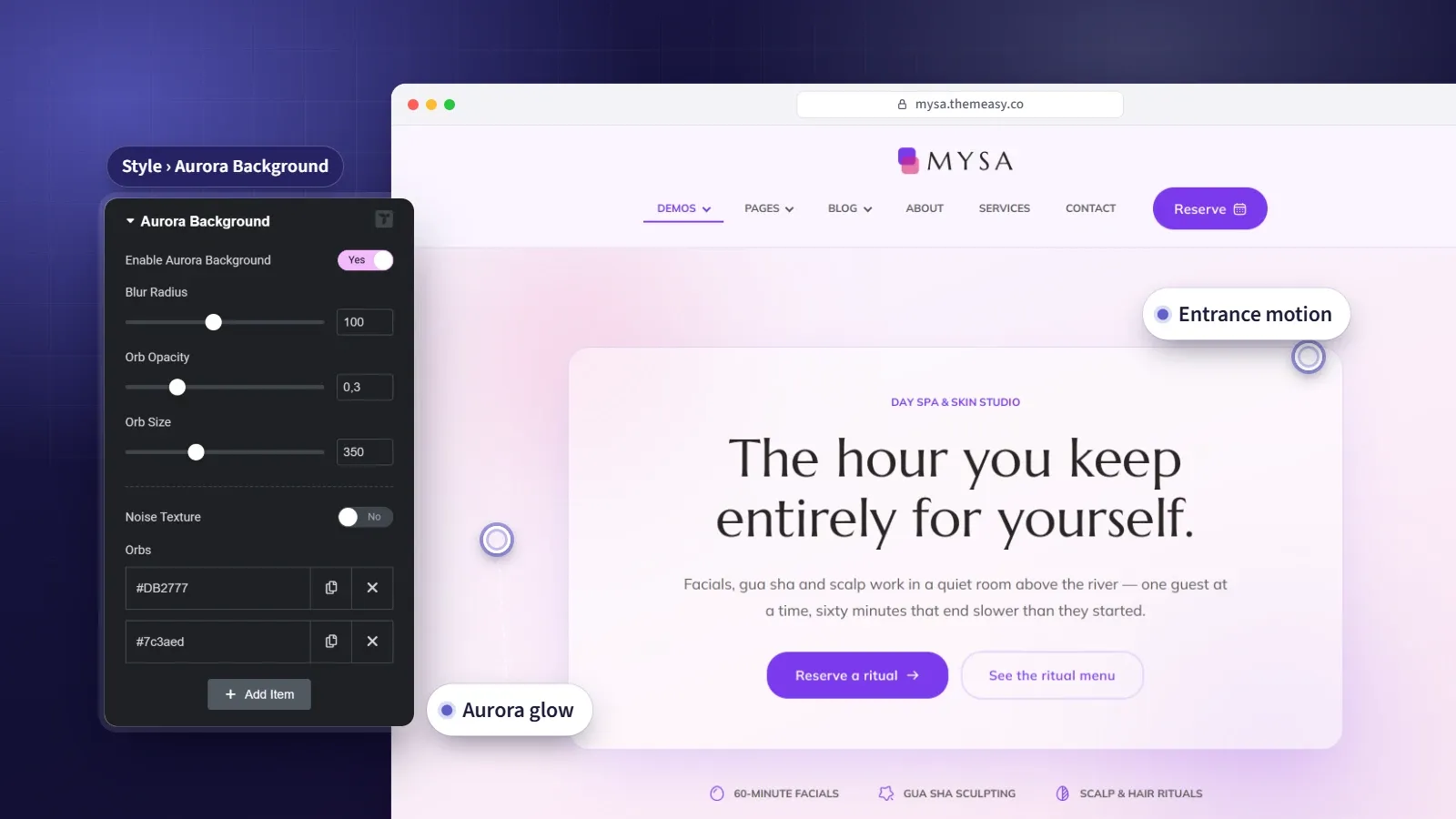
Motion and rich backgrounds on any container — no code.
The difference between a good page and a memorable one is often motion — the way a section eases in, a background that breathes, a layer that drifts as you scroll. Usually that polish costs developer time. Themeasy moves it into the editor.
Select any Elementor container and you’ll find new sections across its Advanced, Layout and Style tabs: entrance and hover animation, sticky behavior, and a set of backgrounds — aurora, animated gradient, grid patterns, film grain and parallax layers — that turn a flat block into something with depth. No snippets, no libraries to wire up. Just the controls, where you’re already working.
At a glance
- Motion, parallax and backgrounds on any container
- No custom CSS or JavaScript
- Aurora, grid patterns, film grain and animated gradients built in
- Sticky columns and per-container dark mode
- Entrance and hover motion replay in the editor
What you get
Scroll & hover motion
Entrance animations as a section comes into view, played on the container or staggered across its children. Add scroll-driven inertia and zoom, and hover interactions — including a label that follows the pointer.
Aurora & animated gradients
Soft, glowing color orbs and slowly shifting gradient backgrounds, with optional grain texture — the very look you're scrolling through on this site.
Grid patterns & film grain
Five patterns — grid, vertical lines, dots, crosses and diagonal stripes — with fade masks, a spotlight that follows the cursor and a highlight that runs down the lines. A film-grain texture adds depth to flat color.
Parallax layers
Floating text, icon and image layers that drift with scroll and mouse movement, placed in front of or behind your content.
Sticky columns
Pin a column so it stays in view while the page scrolls past. A column taller than the screen can scroll inside its own height, and each device can opt out.
Dark mode, one container at a time
Flip a single container to the dark palette with one switch. The rest of the page, and the rest of the site, stays as it was.
Every effect, and where to find it
| Effect | What it does | Tab |
|---|---|---|
| Motion — Animation | Entrance animation on the container or on each child in sequence, plus optional scroll inertia and zoom | Advanced |
| Motion — Hover Interactions | A hover animation on the container or its children, with an optional cursor label | Advanced |
| Sticky Column | Pins a column while the page scrolls past, with a scrollable mode for tall columns and a per-device off switch | Layout |
| Dark Mode | Applies the dark palette to a single container | Style |
| Backdrop Blur | Frosts whatever sits behind the container, seen through a translucent or empty background | Style |
| Border Effect | Solid or gradient corner edges, or corner brackets | Style |
| Background Motion | A slowly shifting two-color gradient background | Style |
| Aurora Background | Glowing color orbs with an optional noise texture | Style |
| Texture | A film-grain overlay, behind or above the content | Style |
| Grid Pattern | Grid, vertical lines, dots, crosses or diagonal stripes, with fade masks, a cursor spotlight and a line drip | Style |
| Parallax Layers | Floating text, icon and image layers that drift with scroll and mouse | Style |
Questions, answered
Are these effects included when I buy a single theme?
Yes. Every premium theme ships with the full Themeasy plugin, container effects included — the same controls, no subscription needed.
Do the container effects work with any theme?
They run on Themeasy themes. Pro and Agency include every Themeasy theme, and so does any premium theme bought on its own. On another theme, the Widgets plan still brings Themeasy Motion to the widgets themselves.
Do I have to write any CSS or JavaScript?
No. Every effect is a control inside Elementor, spread across the container's Advanced, Layout and Style tabs.
Can I use these on any section?
Yes — the controls appear on every Elementor container, so any section on any page can carry motion or a rich background.
Do I see the effects while I edit?
Entrance and hover animations replay on the editor canvas as soon as you pick them. Inertia Scroll follows the page's real scroll, so use Elementor's Preview Changes button to see that one as visitors will.
What about visitors who prefer reduced motion?
The decorative motion steps aside. The grid's line drip is skipped and its cursor spotlight falls back to a steady pattern when a device asks for reduced motion.
Made to work together
Per-Page Control
Override anything — for just one page.
Tune colors, spacing, entry animations, the header and performance on a single page, without touching your global setup or writing code.
ExploreWidget Library
A widget for every section you'll ever build.
128 polished Elementor widgets across twelve categories — text, media, sliders, dynamic post and product loops, headers, footers and more.
ExploreColors & Typography
Your design system, defined once.
Set brand colors with light and dark values, a responsive type scale and eight display styles — then watch them flow into Elementor's native pickers.
ExploreEvery feature, every site, one plan
Container Effects ships inside the Themeasy plugin — with every premium theme and every Pro subscription. Own it in a single theme, or go Pro and run the whole toolkit on unlimited sites.