One source of truth for your brand
Define colors, fonts and a responsive type scale in one panel. Themeasy syncs them into Elementor's Global Colors and Fonts, so your brand shows up natively everywhere you design.
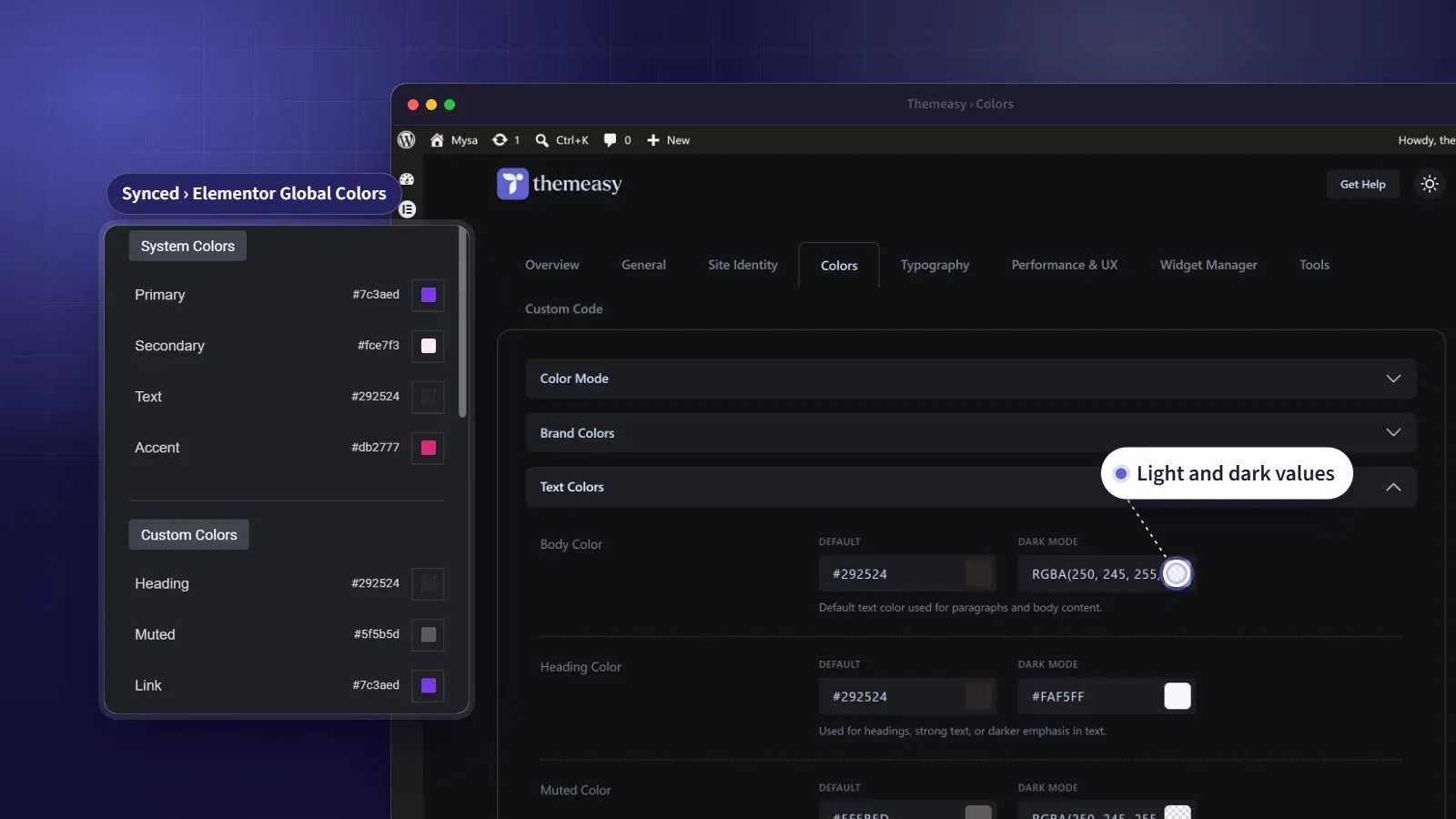
Your design system, defined once.
A brand only feels coherent when one decision flows everywhere. Define your primary color once and it should appear in the theme, in every widget, and in the page builder’s color picker — not get re-entered, slightly differently, in three places. That single source of truth is what this feature is for.
Set your colors, fonts and a responsive type scale in the Themeasy settings panel, and they sync straight into Elementor’s Global Colors and Global Fonts. The main brand colors fill the native swatches; the rest arrive as named globals, dark variants included. Eight display styles and a button preset join them as global fonts, each carrying its own responsive size, so a headline looks the same wherever you apply it.
At a glance
- One palette, with light and dark values
- Three font roles from any source
- Responsive heading and body sizes
- Eight display styles, ready in Elementor
- 29 colors and 13 font styles synced into Elementor's pickers
What you get
Light and dark in one place
Set independent light and dark values for text, backgrounds, borders and buttons — your dark mode is designed on purpose, not guessed at.
Three font roles, any source
Body, heading and accent fonts from Google Fonts, Adobe Fonts or your own uploads, each with its own weight, line height and spacing.
A responsive type scale
Set H1–H6 and five body sizes for phone, tablet and desktop once, and text resizes cleanly without a single media query.
Eight display styles
Display 1 to Display 8 are complete type presets — family, responsive size, weight, case and spacing. They sit in the Global picker of every Typography control in Elementor, so a headline style is one click away.
One typography for every button
A single Button preset sets the type for every button surface, from the Button widget and calls to action to pricing tables, forms and WooCommerce buttons.
Synced into Elementor
Your palette and fonts flow into Elementor's native Global Colors and Fonts each time you save, so your brand is right there in every picker you open.
Define it once, use it everywhere
Colors
A full palette with light and dark values where it matters.
- Brand, text, background and button colors
- Borders, neutrals and feedback states
- Independent dark-mode values
- Hex, RGB or HSL
Typography
Three font roles, fully styled.
- Body, heading and accent fonts
- Google, Adobe or custom uploads
- H1–H6 and five body sizes, per breakpoint
- Eight Display styles and a Button preset
Elementor sync
Your brand, native in Elementor.
- Fills the four system color swatches
- Adds the rest as named globals, dark variants included
- Sets the four system fonts
- Adds Display 1–8 and Button as global fonts
Questions, answered
Is this included when I buy a single theme?
Yes. Every premium theme ships with the full Themeasy plugin — colors, typography and the Elementor sync included, no subscription needed.
Does it work with any theme?
The colors and typography panel runs on Themeasy themes, because it styles the theme itself. On another theme, Themeasy widgets take that theme's fonts and are styled from each widget's own Style tab.
Where do my colors and fonts show up?
Everywhere — across the theme, every Themeasy widget and Elementor's own pickers. Saving the settings panel pushes your brand into Elementor automatically.
What if I edit a global color inside Elementor?
The sync runs one way, from the Themeasy panel to Elementor, so the panel stays the source of truth and the next save restores its values. Colors and fonts you add yourself in Elementor are left alone.
Are font sizes synced to Elementor too?
For the Display styles and the Button preset, yes — each carries its own size for phone, tablet and desktop. The four system fonts leave size out on purpose, so headings and body text keep following the responsive scale you set in the panel.
Can I use my own fonts?
Yes. Pick Google Fonts, Adobe Fonts through your Typekit ID, or your own font files, uploaded with the free Custom Fonts plugin.
Made to work together
Container Effects
Motion and rich backgrounds on any container — no code.
Add entrance motion, hover interactions, sticky columns, aurora glows, grid patterns, parallax layers and per-container dark mode to any Elementor section.
ExploreSettings Panel
One panel to run your whole site.
Site identity, layout, performance, custom code, a widget manager and one-click export/import — every global setting in one tidy place.
ExplorePer-Page Control
Override anything — for just one page.
Tune colors, spacing, entry animations, the header and performance on a single page, without touching your global setup or writing code.
ExploreEvery feature, every site, one plan
Colors & Typography ships inside the Themeasy plugin — with every premium theme and every Pro subscription. Own it in a single theme, or go Pro and run the whole toolkit on unlimited sites.