128 widgets, one design language
From accordions and carousels to dynamic post grids and store loops, the Themeasy library gives Elementor a complete, consistent toolkit — no widget zoo, no mismatched styles.
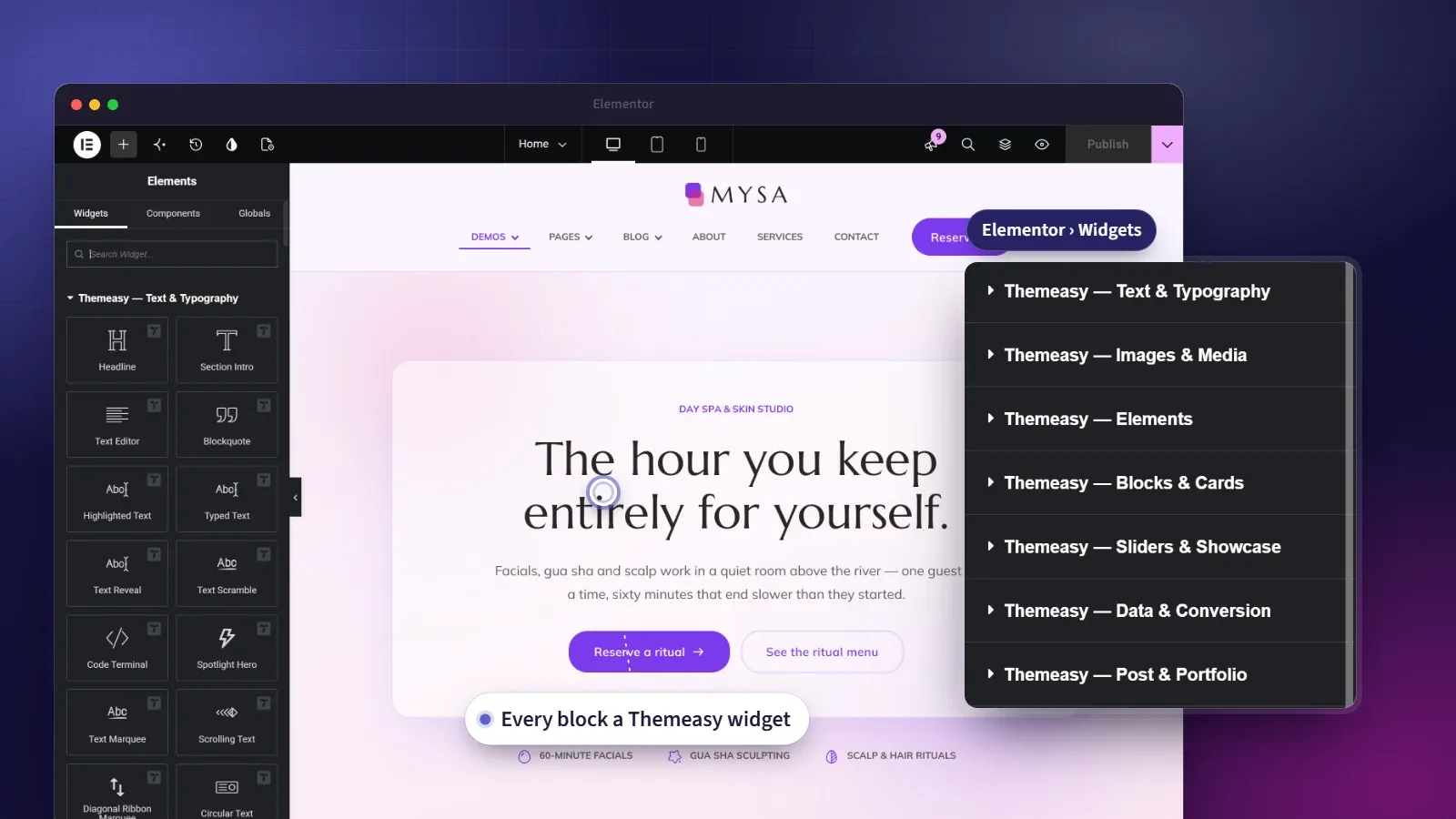
A widget for every section you'll ever build.
The Themeasy library is one coherent set — 128 widgets designed together, sharing the same control layout and the same design language. Every control sits where you expect it, every widget behaves like its neighbors, and every section you drop in already speaks your site’s design language.
That set is deep. Static building blocks like cards, sliders and pricing tables sit alongside dynamic widgets — post grids, archive loops, product carousels — that fill themselves with live content. Build the layout once; it stays current as you publish. And because the editor adapts to what you’re working on, the right widgets are always the first ones you see.
At a glance
- 128 widgets across twelve categories
- GSAP-powered motion with signature animations
- Live inline editing — click the text and type
- 5,200+ icons in Elementor's icon picker
- Works with free Elementor — no Pro required
- Dynamic post and product loops
What you get
128 widgets
A complete set spanning twelve categories, all sharing one design language — so a page never looks like it was assembled from spare parts.
Dynamic by design
Post and product widgets pull live content from your site, so a layout you build once keeps itself current as you publish.
Motion on GSAP
Animated widgets run on GSAP, with signature entrance and hover animations designed for each widget. They replay on the editor canvas the moment you pick one, so you see the motion while you build.
Edit text right on the page
Click any headline or paragraph on the canvas and type — inline editing works properly in every Themeasy widget, because we built for it.
5,200+ icons, built in
Feather and four Solar styles — Line, Solid, Duotone and Broken — sit in Elementor's icon picker. Every icon renders as inline SVG and takes the color you give it.
An editor that stays tidy
The widget panel reorders itself around what you're editing, so header pieces come first in a header and footer pieces in a footer. On a Themeasy theme, the Widget Manager also switches off any widget you don't use.
128 widgets, built to one standard
Most widget packs pile on blocks you'll never use, with editor previews that never quite match the front end. The Themeasy library is the opposite — every widget is designed to a single standard, sorted into clean categories, and fully live in the editor, so what you set is exactly what you ship.
The Widgets plan carries the 87 content widgets, with Themeasy Motion, in any theme. Pro and Agency carry all 128 on a Themeasy theme (119 on any other — the WooCommerce and cart widgets run on a Themeasy theme), and so does the perpetual license bundled into every premium theme.
Showing all 128 widgets
| Widget | What it does | Category |
|---|---|---|
| Blockquote | Editorial pull-quote with author and a decorative mark | Text & Typography |
| Circular Text | Text set on a circular path with continuous rotation | Text & Typography |
| Code Terminal | A terminal window that types commands and reveals their output | Text & Typography |
| Diagonal Ribbon Marquee | Two diagonal text ribbons crossed in an X, looping in opposite directions | Text & Typography |
| Headline | Styled heading with a pre-title and multi-part title | Text & Typography |
| Highlighted Text | Hand-drawn highlights, underlines and circles that draw themselves | Text & Typography |
| Scrolling Text | Scroll-scrubbed text that drifts as the page moves | Text & Typography |
| Section Intro | Section opener — eyebrow, accented title, description and up to two buttons | Text & Typography |
| Spotlight Hero | Display headline lit by a spotlight that follows the cursor | Text & Typography |
| Table of Contents | Auto-built table of contents that highlights the section in view | Text & Typography |
| Text Editor | Rich-text block with alignment and text animations | Text & Typography |
| Text Marquee | Looping horizontal text marquee, pauses on hover | Text & Typography |
| Text Reveal | Scroll-scrubbed, word-by-word color reveal | Text & Typography |
| Text Scramble | Headline that decodes letter by letter, optionally cycling words | Text & Typography |
| Typed Text | Typewriter effect that cycles through phrases | Text & Typography |
| Audio Player | Custom audio player for podcasts and music, with a playlist | Images & Media |
| Before / After | Drag a handle to compare two images side by side | Images & Media |
| Bento Gallery | Asymmetric bento mosaic of images with captions and a lightbox | Images & Media |
| Device Showcase | A screenshot or video framed in a browser, laptop or phone mockup | Images & Media |
| Gallery | Filterable image grid with a lightbox | Images & Media |
| Hotspot Image | Image with interactive pins that reveal rich tooltips | Images & Media |
| Image | Single image with caption, lightbox or custom link | Images & Media |
| Image Accordion | Expanding image panels with overlay content | Images & Media |
| Image Carousel | Swiper image slider with lightbox and overlays | Images & Media |
| Image Distortion | WebGL distortion that morphs between two images on hover | Images & Media |
| Image Hover Scroll | Tall image scrolls within its frame on hover | Images & Media |
| Image Marquee | Continuously looping marquee of images | Images & Media |
| Image Reveal | Scroll-triggered reveal animation for an image | Images & Media |
| Image Shapes | Images cut to ready-made shapes — blobs, arches, squircles and more | Images & Media |
| Image Trail | Images that pop in along the cursor path as the pointer moves | Images & Media |
| Lottie Animation | Plays a Lottie / Bodymovin JSON animation with triggers | Images & Media |
| Parallax Tilt | Pointer-reactive 3D tilt and float, with optional glare | Images & Media |
| Video | YouTube, Vimeo or self-hosted video behind a designed poster and play button | Images & Media |
| Badge List | Inline badges or tags with links and hover effects | Elements |
| Button | Button or link with style presets, icons and scroll-text | Elements |
| Content Switch | Two-state toggle that swaps between two page containers | Elements |
| Divider | Line or SVG-shape separator with an optional icon or text | Elements |
| Icon | Single icon with an optional shape background | Elements |
| Icon List | List with icons, optional counters and per-item links | Elements |
| Site Search | Search form with field, button and post-type filters | Elements |
| Slide Button | Call-to-action button whose label slides to a second label on hover | Elements |
| Social Profiles | Row or column of social media icon links | Elements |
| Social Proof | Avatar stack, star rating and a count-up customer message | Elements |
| Social Share Row | Row of share buttons for the major networks | Elements |
| Accordion | Collapsible content sections, with an optional multi-open mode | Blocks & Cards |
| Bento Grid | Asymmetric grid of cells with spotlight and tilt on hover | Blocks & Cards |
| Call to Action | Banner, cover or split conversion block with two buttons | Blocks & Cards |
| Card | Icon or image box with title, text and an optional button | Blocks & Cards |
| Card Extended | Richer card with image, label, overlay icon and rating | Blocks & Cards |
| Client Logos | Logo wall as a grid, carousel or marquee | Blocks & Cards |
| FAQ Accordion | Editorial FAQ with large questions, counters and a morphing indicator | Blocks & Cards |
| Feature Orbit | Items orbiting a central badge in a circular diagram | Blocks & Cards |
| Flip Box | Two-sided card that flips to reveal hidden content | Blocks & Cards |
| Horizontal Timeline | Draggable horizontal timeline of dated milestones | Blocks & Cards |
| Hover Reveal List | List rows that reveal images trailing the pointer | Blocks & Cards |
| Logo Wall | A static wall of brand logos framed by shared hairline borders | Blocks & Cards |
| Nested Tabs | Tabs whose panels are real Elementor containers — drop any widget in | Blocks & Cards |
| Steps | Connected, numbered process steps, horizontal or vertical | Blocks & Cards |
| Tabs | Tabbed content panels, horizontal or vertical | Blocks & Cards |
| Team Member | Profile card with portrait, bio and social links | Blocks & Cards |
| Testimonial | Single testimonial with photo, name, role and rating | Blocks & Cards |
| Testimonial Carousel | Rotating testimonials with photos and star ratings | Blocks & Cards |
| Testimonial Wall | A "wall of love" — testimonial columns scrolling in endless loops | Blocks & Cards |
| Timeline | Vertical chronological timeline with icon markers | Blocks & Cards |
| 3D Coverflow | Perspective cover-flow carousel with a real 3D depth effect | Sliders & Showcase |
| Card Deck | A swipeable stack of cards that restacks endlessly | Sliders & Showcase |
| Horizontal Showcase | Pinned, scroll-scrubbed horizontal panel showcase | Sliders & Showcase |
| Immersive Slider | Full-width hero slider with WebGL shader transitions | Sliders & Showcase |
| Infinite Drag Canvas | An endless image canvas visitors pan freely in any direction | Sliders & Showcase |
| Liquid Hero | Hero banner whose background image melts under the cursor | Sliders & Showcase |
| Scroll Sequence | A pinned stage that plays images as a story while you scroll | Sliders & Showcase |
| Scroll Stack | Sticky cards that stack, shrink and dim as you scroll | Sliders & Showcase |
| Slider | Full-screen hero carousel with background image and CTAs | Sliders & Showcase |
| Sticky Scroll-Sync | Pinned media column synced to scrolling content steps | Sliders & Showcase |
| Sticky Zoom Hero | Hero media that grows from a card to full-bleed on scroll | Sliders & Showcase |
| Animated Chart | Bar, donut and line charts that animate in, with real text labels | Data & Conversion |
| Business Hours | Opening hours with today highlighted and a live open/closed status | Data & Conversion |
| Comparison Table | Feature or plan comparison matrix with a sticky header | Data & Conversion |
| Countdown Timer | Fixed-date or evergreen countdown with expiry actions | Data & Conversion |
| Counter | Number that animates from zero up to a target value | Data & Conversion |
| Form | Styled Contact Form 7 wrapper with three design skins | Data & Conversion |
| Line Progress Bar | Horizontal progress bar with count-up on scroll | Data & Conversion |
| Maps | Google Map embed with markers and custom styling | Data & Conversion |
| Modal Popup | A button, link or image that opens an accessible modal dialog | Data & Conversion |
| Price List | Menu-style price list with leader lines, badges and sale prices | Data & Conversion |
| Pricing Table | Pricing plans with a billing toggle and feature list | Data & Conversion |
| Radial Progress Bar | Circular progress indicator with a centered count-up | Data & Conversion |
| Star Rating | Fractional star rating with precise per-star fill | Data & Conversion |
| Archive Results | The main archive and search loop for matching posts | Post & Portfolio |
| Author Box | The current post author's avatar, bio and profile links | Post & Portfolio |
| Featured Image | Outputs the current post's featured image | Post & Portfolio |
| Post Carousel | Swiper carousel of posts from a custom query | Post & Portfolio |
| Post Comments | The post's comment thread and reply form | Post & Portfolio |
| Post Grid | Grid loop of posts for blogs, archives or portfolios | Post & Portfolio |
| Post Meta | Date, author, comments, reading time and terms | Post & Portfolio |
| Post Navigation | Previous and next post links on single templates | Post & Portfolio |
| Post Taxonomy | The post's categories or tags, shown as badges | Post & Portfolio |
| Post Title | Outputs the current post or archive title | Post & Portfolio |
| Ajax Product Filter | Filter by price, category and attributes — no page reload | WooCommerce |
| Product Attributes | A product's additional-information table as its own widget | WooCommerce |
| Product Carousel | Swiper carousel of products from a query | WooCommerce |
| Product Categories Carousel | Carousel of product categories with image overlays | WooCommerce |
| Product Grid | Filterable product grid with toolbar and pagination | WooCommerce |
| Product Reviews | A product's reviews and review form as its own widget | WooCommerce |
| Product Single | Any product by ID in a compact quick-view layout | WooCommerce |
| Currency Switcher | Currency selector for multi-currency stores | Header |
| Custom Toggle | Button that opens a custom off-canvas panel | Header |
| Language Switcher | Polylang language selector with flags | Header |
| Menu | Horizontal nav with dropdowns and mega-menu support | Header |
| Menu Toggle | Hamburger button that opens the menu off-canvas | Header |
| Mini Cart | Off-canvas WooCommerce cart with the product list | Header |
| Mini Cart Toggle | Cart icon with item counter that opens the mini cart | Header |
| Mobile Menu | Vertical collapsible menu for off-canvas panels | Header |
| Search Toggle | Search icon that opens an off-canvas search panel | Header |
| Shop Toggle | Header link to the wishlist, compare or account page, with a live counter | Header |
| Site Logo | Site logo with optional title and a sticky variant | Header |
| Vertical Megamenu | A "Shop by categories" menu with mega-menu flyouts | Header |
| Copyright Bar | Footer bar with dynamic-year copyright and legal links | Footer |
| Breadcrumbs | Navigational trail with schema.org markup | Site Utilities |
| Cursor | Custom animated cursor replacing the default pointer | Site Utilities |
| Notice Box | Modal message with delay, scroll or exit-intent triggers | Site Utilities |
| Notification Bar | Dismissible site-wide announcement bar with a button | Site Utilities |
| Scroll to Top | Floating back-to-top button with scroll progress | Site Utilities |
| Side Icons | Fixed page-edge icon bar with tooltips | Site Utilities |
| Side Label | Fixed page-edge vertical label with icon and link | Site Utilities |
| Category List | Taxonomy terms as linked columns for a mega-menu panel | Megamenu |
| Featured Card | Featured item with image, title and link in a panel | Megamenu |
| Promo Banner | Promotional call-to-action block inside a mega menu | Megamenu |
No widgets match that category — try another one.
Questions, answered
Are all 128 widgets included when I buy a single theme?
Yes. Every premium theme ships with the full Themeasy plugin, all 128 widgets included — no subscription needed. A Pro subscription adds the rest of the theme catalog and the cloud template library, never missing widgets.
Can I use the widgets without a Themeasy theme?
Yes. The Widgets plan is built for that — 87 widgets, every content widget with Themeasy Motion, in the theme you already use. Pro adds the header, footer, post, site, mega menu and form widgets, for 119 in any theme; the WooCommerce and cart widgets run on the Themeasy themes included with Pro, bringing the set to 128.
Do I need Elementor Pro?
No. The Themeasy library runs on the free version of Elementor — Pro is never required. WooCommerce is only needed for the store widgets.
Will 128 widgets slow my site down?
No. Widgets keep their styles and scripts in separate files, so a page loads what its own widgets need rather than one bundle for all 128. On a Themeasy theme, the Widget Manager also lets you switch off anything you don't use.
Do the store widgets need WooCommerce?
Yes. The store widgets run on the Themeasy WooCommerce features, which load with a Themeasy theme, so the WooCommerce category appears once WooCommerce is active on one. Pro includes every Themeasy theme.
Does the library keep growing?
Yes. New widgets arrive with plugin updates, so subscribers always run the latest library, and theme owners receive them throughout their update window.
What's included in the free plugin?
Themeasy Lite, the free plugin on its way to WordPress.org (the pricing page has the waitlist), ships 18 essential widgets, without the motion. The Widgets plan carries the 87 content widgets in any theme; the full set of 128, the theme builder and the WooCommerce features come with Pro or any premium theme.
Made to work together
Theme Builder
Design every part of your site, visually.
Build headers, footers, archives, single posts and more in Elementor — each one a reusable Global Section, placed exactly where your rules say.
ExploreWooCommerce Suite
A storefront WooCommerce wishes it shipped with.
Themeasy replaces WooCommerce's store templates with a richer storefront — catalog toolbar, AJAX filtering, quick view, swatches and a designed checkout.
ExploreMega Menu
Dropdowns worth designing.
Turn any top-level menu item into a full Elementor-designed panel — multi-column link lists, image cards and promo banners.
ExploreEvery feature, every site, one plan
Widget Library ships inside the Themeasy plugin — with every premium theme and every Pro subscription. Own it in a single theme, or go Pro and run the whole toolkit on unlimited sites.