Navigation that sells, not just links
Design a complete panel in Elementor — category lists, featured cards, promo banners — and attach it to a menu item. Choose how wide it opens on desktop and how it behaves in the mobile menu.
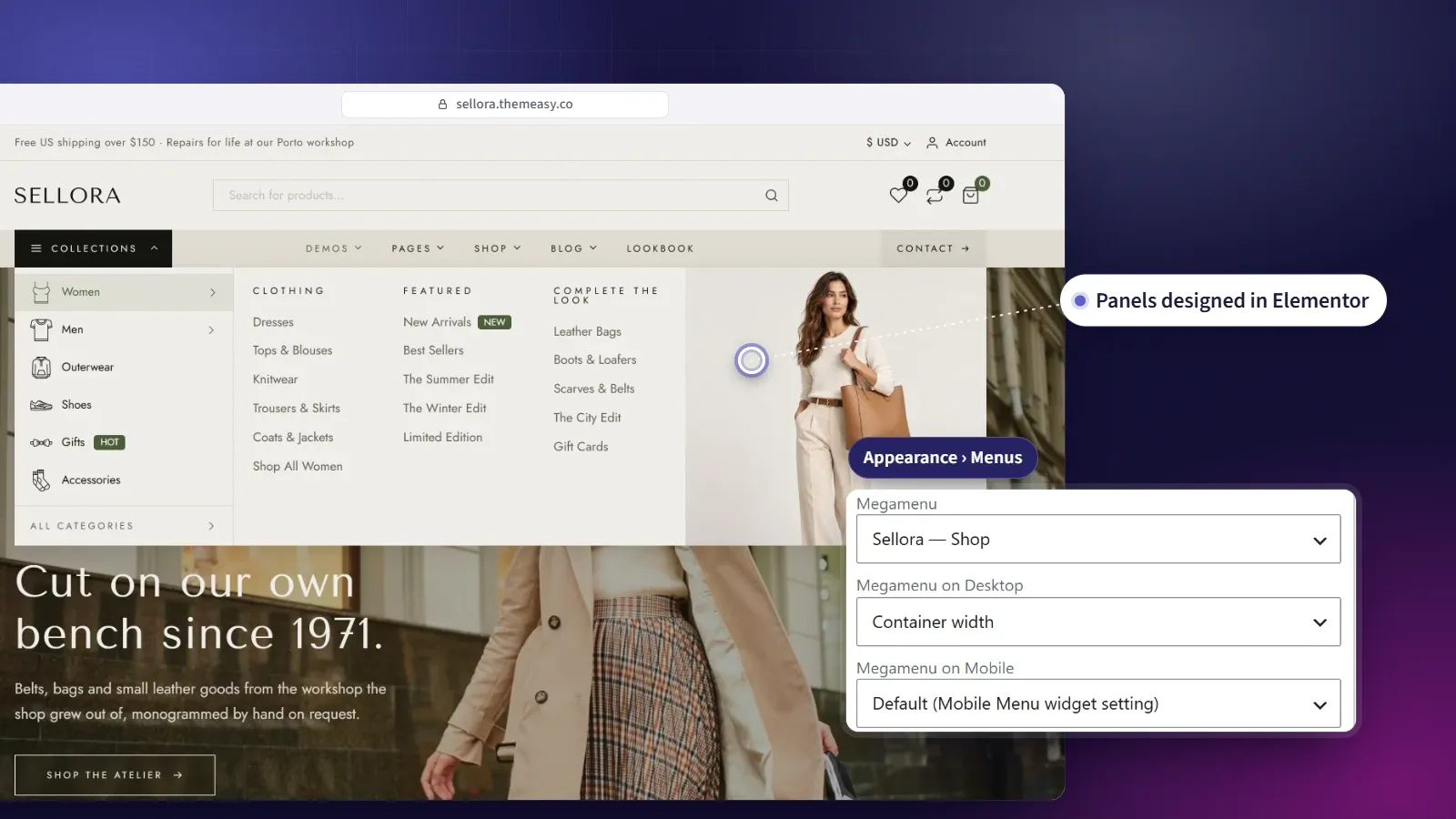
Dropdowns worth designing.
A dropdown doesn’t have to be a plain list of links. With a mega menu, a top-level menu item opens a full panel you’ve designed in Elementor — columns of categorized links, a featured card, a promo banner driving your latest campaign.
Each panel is built on a blank canvas with three purpose-made widgets, then attached to a menu item in the usual WordPress menu screen. On desktop it opens on hover or click, at the width and alignment you pick, and it always stays inside the screen. On mobile you decide per item whether the panel opens inside the menu, turns into a plain link or steps aside — so your navigation looks ambitious without leaving anyone stranded.
At a glance
- Full Elementor-designed dropdown panels
- Category lists, featured cards and promo banners
- Attach to any top-level menu item
- Five width and alignment options on desktop
- Mobile behavior set per menu, or per item
What you get
Designed in Elementor
A panel is a blank Elementor canvas — lay out columns, cards and banners exactly the way you want them, with the full widget library at hand.
Category lists, automatically
Pull links straight from any taxonomy, complete with counts, thumbnails and badges — or curate every item by hand.
Featured cards & promo banners
Close a column with an image card or a full-bleed promo banner, each one fully clickable and tuned with its own hover effect.
Sized and placed per item
Align a panel to its menu item, stretch it to your content width, or run it edge to edge. A panel never runs off the screen — it shifts back inside, and narrows when the screen is smaller than the panel.
Yours to decide on mobile
By default the same panel opens inside the mobile menu. When a panel was drawn for a wide dropdown, show its item as a plain link or hide it instead, for the whole menu or one item at a time.
A shop-by-category menu
The Vertical Megamenu widget lists your categories in a column and opens a panel beside each one — the layout large stores use for their catalog.
Three widgets built for mega menus
Alongside the full content library, the Themeasy — Megamenu category adds three widgets shaped for a navigation panel.
Category List
A tidy list of categorized links, each with an optional thumbnail, icon, badge, description and count.
- Pull items from a taxonomy or add them by hand
- One to four columns, inline or stacked
- Optional view-all link and count pills
Featured Card
A compact image card with a badge, eyebrow, title, description and call to action — sized for a narrow column.
- The whole card is clickable
- Hover effects — zoom, lift or overlay fade
- Your choice of aspect ratio
Promo Banner
A full-bleed background-image banner to close a column with a strong call to action.
- Eyebrow, title, subtitle and button
- Overlay color and alignment controls
- Hover zoom or darken
From plain dropdown to designed panel
-
Build the panel
Create a mega menu and design it in Elementor on a blank canvas using the Megamenu widgets.
-
Attach it to a menu item
In Appearance → Menus, expand a top-level item and pick your panel from the Megamenu field.
-
Set its width and mobile behavior
On the same menu item, choose how the panel sits under the bar on desktop and what happens to it in the mobile menu.
Questions, answered
Is the mega menu included when I buy a single theme?
Yes. Every premium theme ships with the full Themeasy plugin — the mega menu and its three panel widgets included, no subscription needed.
What do I need before I start?
A Themeasy theme with Elementor active, a WordPress menu to attach to, and a header built with the Menu widget so the panel can render.
Can every menu item have a panel?
Panels attach to top-level menu items. Sub-items keep the regular dropdown.
What happens on mobile?
By default the panel opens inside the mobile menu when a visitor expands its item. If a panel doesn't suit a narrow screen, the Mobile Menu widget can show the item as a plain link or hide it, and each menu item can override that rule. When you hide an item, keep its links reachable elsewhere in the mobile menu.
Will a wide panel overflow on a small laptop?
No. Each time a panel opens it is placed to fit the screen. It shifts back inside the edge, and narrows when the screen is smaller than the panel.
Does a panel have its own URL?
No — a panel isn't a public page. It appears only on the menu item you attach it to.
Made to work together
Theme Builder
Design every part of your site, visually.
Build headers, footers, archives, single posts and more in Elementor — each one a reusable Global Section, placed exactly where your rules say.
ExploreWidget Library
A widget for every section you'll ever build.
128 polished Elementor widgets across twelve categories — text, media, sliders, dynamic post and product loops, headers, footers and more.
ExploreEvery feature, every site, one plan
Mega Menu ships inside the Themeasy plugin — with every premium theme and every Pro subscription. Own it in a single theme, or go Pro and run the whole toolkit on unlimited sites.