Build your whole site, not just your pages
Theme Builder is the visual dashboard for the parts of WordPress a theme usually keeps sealed — the header, the footer, archives, single posts, even the 404. Design each one in Elementor and reuse it across the site.
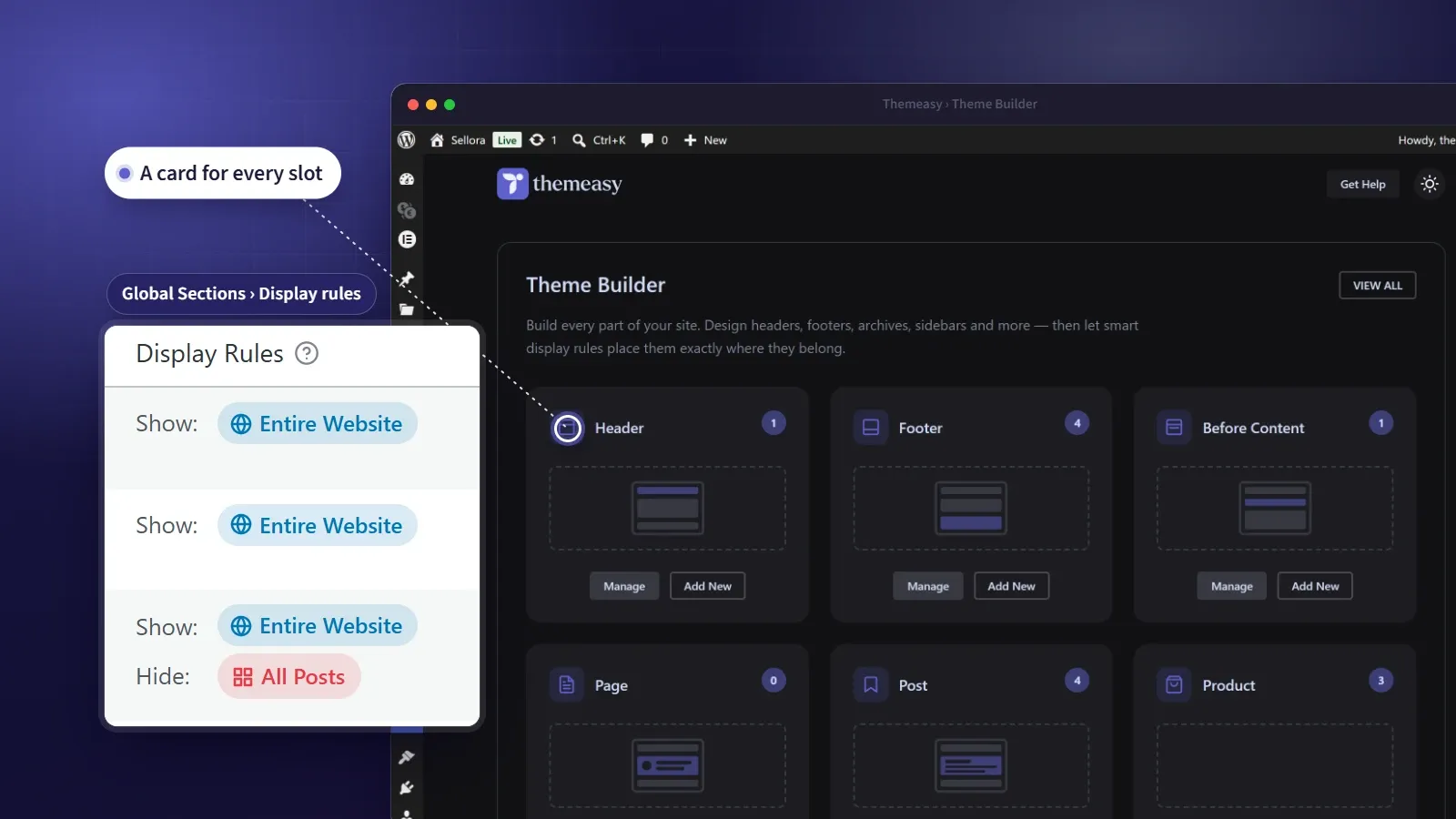
Design every part of your site, visually.
Most themes hand you the body of a page and keep the rest — the header, the footer, the archive layouts — sealed behind their own settings. Theme Builder opens all of it. Every structural part of your site becomes something you design in Elementor and manage from a single dashboard.
The building block is the Global Section: a reusable block that fills one slot and replaces the theme’s default wherever your display rules place it. Build a header once and it appears site-wide; build a landing-page footer and scope it to just your campaigns. Nothing is hard-coded, and nothing is global by accident.
At a glance
- Twelve section types, from header to 404
- Reusable Global Sections, designed in Elementor
- A Header Builder with scroll modes and off-canvas panels
- Display rules with exclusions — the most specific wins
- Target whole groups of pages with Page Variants
What you get
One dashboard, every slot
A card for every part of your site — header, footer, posts, archives, right down to the 404 — each showing how many templates you've built and a one-click way to add another.
Reusable Global Sections
Everything you build is a Global Section — a block designed once and reused. It isn't a public page; it quietly replaces the theme default for its slot wherever your rules place it.
A header built from containers
Mark a container as the desktop navbar, the mobile bar or an off-canvas panel, then choose how the header behaves on scroll. It can sit in the flow, overlap the hero, stay fixed, or hide on the way down and return on the way up.
Rules that decide placement
Show a section across the whole site, on a single page, or anything in between. Display rules combine with OR, exclude rules carve out exceptions, and the most specific rule always wins.
Target groups of pages
Tag pages as Dark Mode, One-Page or Landing with Page Variants, then style or target every page that carries the trait at once — new pages are picked up automatically.
Store areas included
With WooCommerce active, a section can replace the product archive, the product summary and the related, up-sell and cross-sell lists, built with the same product widgets as the rest of your shop.
Headers that behave, built from containers
Inside a header section, every Elementor container gains a Header Builder panel. Say what each container is, and the pieces connect on their own.
Desktop and mobile navbars
A bar for each, with its own scroll behavior.
- Relative, Absolute, Always Fixed or Smart Hide/Show
- Normal and sticky states, each with its own background and backdrop blur
- Pin a single row of a taller header while the rest scrolls away
Off-canvas panels
Slide-in panels, opened by a toggle in the navbar.
- A mobile menu, a site search or a mini cart
- Opens from the top, bottom, left or right
- The mini cart can open by itself when a product is added
Header widgets
Twelve widgets made for the header.
- Site Logo, Menu and Mobile Menu
- Toggles for the menu, search, cart and custom panels
- Language and currency switchers
Replace any area of the theme
A section's type sets which area it fills — from the frame around every page to the details of a single post and the system pages at the edges. Replace exactly the part you mean to, and leave the rest alone. The store areas appear once WooCommerce is active.
| Area | Group | What you replace |
|---|---|---|
| Before Header | Site structure | An announcement strip above the header |
| Header | Site structure | Your full site header |
| Before Content | Site structure | The breadcrumbs area below the header |
| Before Footer | Site structure | A CTA band above the footer |
| Footer | Site structure | Your full site footer |
| Entry Header | Pages & posts | The title, categories and meta of single content |
| Featured Image | Pages & posts | The featured-image area of a page or post |
| Entry Footer | Pages & posts | Tags, post navigation and the author box |
| Comments | Pages & posts | The comments area |
| Archive Loop | Archives & system | The blog index, category, tag and author listings |
| Search Results | Archives & system | The search results listing |
| Sidebars | Archives & system | The left and right sidebar areas |
| 404 Page | Archives & system | The page visitors see when nothing is found |
| Product Archive | Store | The shop page and the product category, tag and brand listings |
| Product Summary | Store | The top of the product page — gallery, title, price, add to cart and meta |
| Related Products | Store | The related list on a product page |
| Up-Sells | Store | The up-sell list on a product page |
| Cross-Sells | Store | The cross-sell list in the cart |
From blank slot to live in five steps
Importing a demo? Then all of this is already done — the setup wizard brings in every area pre-built, and the site arrives 100% assembled. Customize what's there, or retarget where each section appears. Building from scratch is just as direct.
-
Pick a slot
Open Theme Builder and choose the part of the site you want to build — or start a fresh section from scratch.
-
Set its type
Tell the section which slot it fills, and for pages, posts and archives, which area to replace.
-
Add display rules
Decide where it appears, and add exclusions for the pages it shouldn't.
-
Design in Elementor
Build the section with the full Themeasy widget library and your synced brand colors and fonts.
-
Publish
Save, and it goes live everywhere your rules say it belongs.
Questions, answered
Is Theme Builder included when I buy a single theme?
Yes. Every premium theme ships with the full Themeasy plugin, Theme Builder included — no subscription needed. Subscribing adds the rest of the theme catalog and the cloud template library, not missing features.
Does Theme Builder work with any theme?
It runs on Themeasy themes, because its sections fill slots the theme provides. Pro and Agency include every Themeasy theme, and a premium theme bought on its own carries Theme Builder too.
Do I need Elementor Pro?
No. Theme Builder works with the free version of Elementor — you design every section in the editor you already use, with the Themeasy widget library on top.
Will it replace my current header and footer?
Yes, by design. When a Global Section's display rules match the page a visitor is on, it takes over that slot in place of the theme's default — and only where your rules say.
Can a page have its own header?
Yes. Display rules can give one page, or a whole group of pages, a header of its own. Each page can also decide whether the header overlaps its first section or keeps space above it, from Elementor's Page Settings.
Can one section appear in several places?
A section targets one area at a time. To cover several areas, build a section for each — that keeps every slot deliberate and easy to reason about.
Made to work together
Widget Library
A widget for every section you'll ever build.
128 polished Elementor widgets across twelve categories — text, media, sliders, dynamic post and product loops, headers, footers and more.
ExploreMega Menu
Dropdowns worth designing.
Turn any top-level menu item into a full Elementor-designed panel — multi-column link lists, image cards and promo banners.
ExploreColors & Typography
Your design system, defined once.
Set brand colors with light and dark values, a responsive type scale and eight display styles — then watch them flow into Elementor's native pickers.
ExploreEvery feature, every site, one plan
Theme Builder ships inside the Themeasy plugin — with every premium theme and every Pro subscription. Own it in a single theme, or go Pro and run the whole toolkit on unlimited sites.